Plan, build, review, ship — while you do something else.

c8c turns your AI skills into flows with quality gates and human checkpoints. Works with Claude Code, Codex, and OpenClaw.

No account needed. Works with your existing subscription.

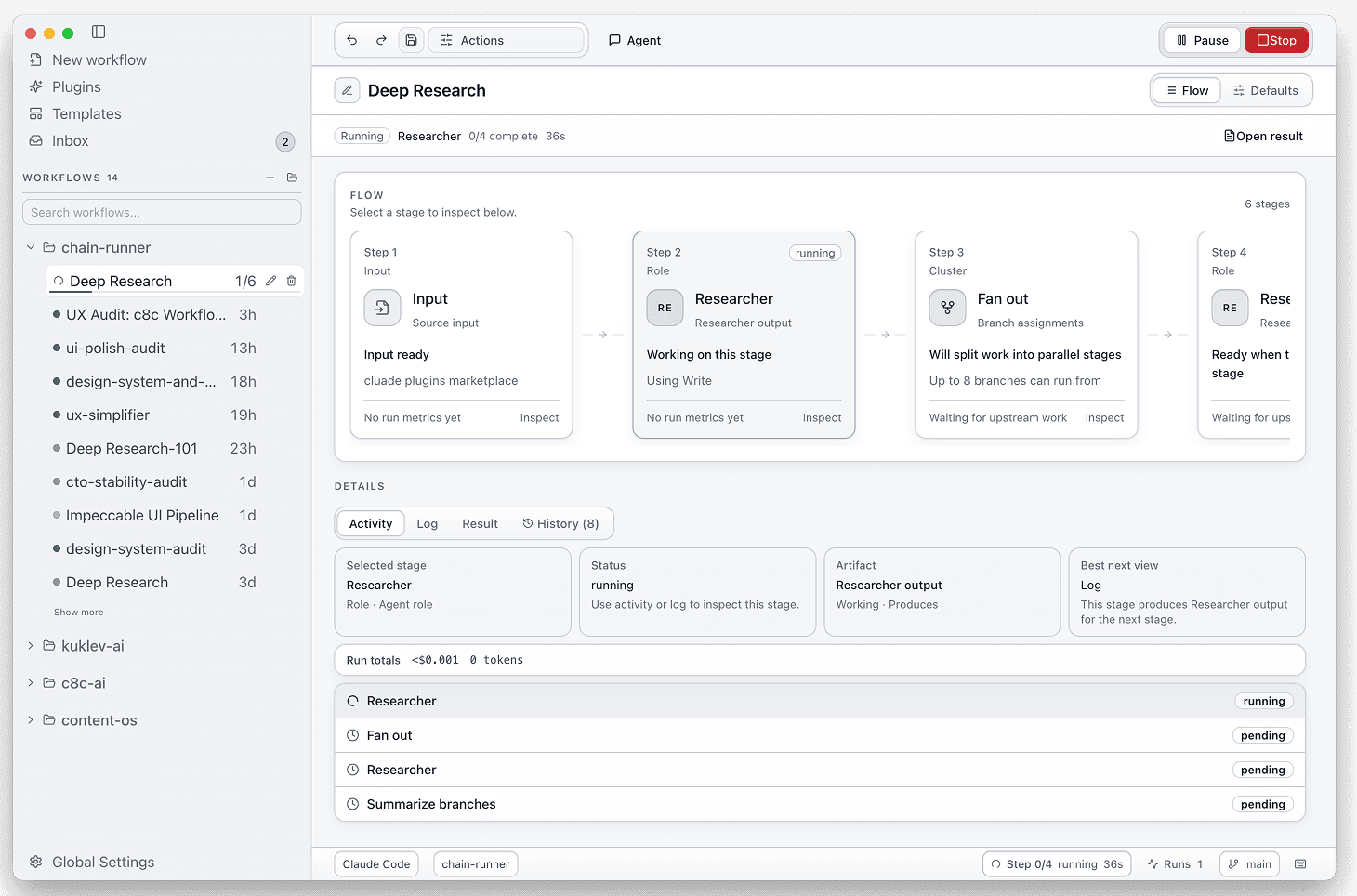
c8c desktop app showing a workflow run with visible stage state, evaluator retry, approval boundary, and result panel

You already do this by hand

You already do this by hand.

You run plan → code → review → test → ship with Claude Code every day.

Plan → code → review → test → ship

The work is good. The handoffs still happen one manual step at a time.

Separate skill. Separate session. Separate copy-paste.

Every handoff means another prompt, another paste, another place where context and artifacts disappear into scrollback.

You are the slow loop.

The system only moves forward when you manually pass output to the next step, wait for it, and decide what to do next.

What c8c does

Runs your skills in sequence. Catches silent failures. Keeps you in control.

Run a multi-step flow, inspect each stage, recover from the one that failed.

01

Runs your skills in sequence — stops only when it needs you.

Pick a template or describe what you want. c8c builds the flow and runs it. You come back to results, not to the next manual step.

Start from a template or generate the flow from a task description.

Stages execute in order with fresh context.

You come back to named results, not another handoff.
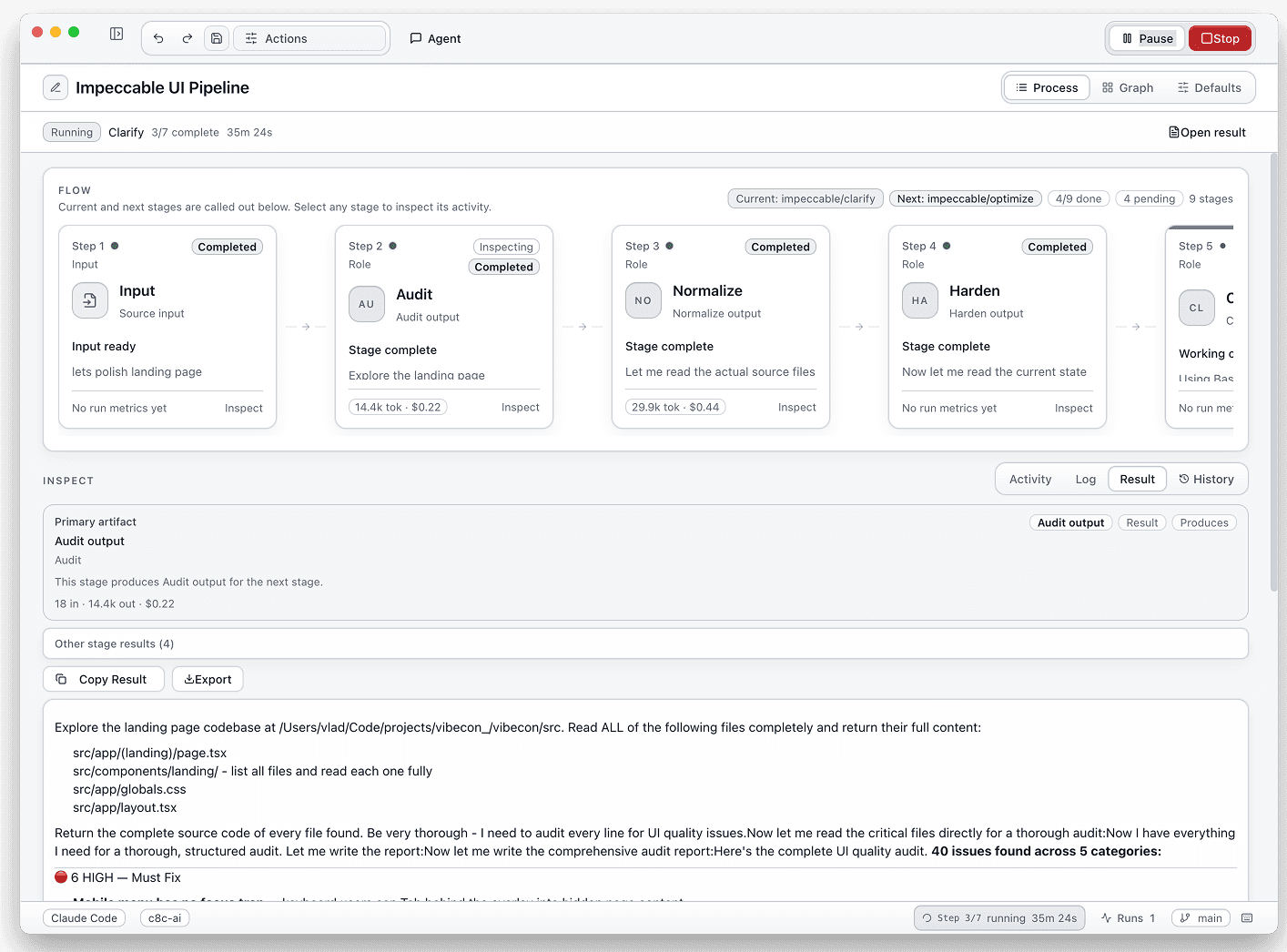
02

Catches what compounds silently.

Evaluator gates score output at every step. Below threshold → auto-retry from the step that failed. Stage fails entirely? Rerun from that stage, not from scratch.

Quality gates sit between the risky steps.

Failures stay visible instead of getting buried in scrollback.

Rerun-from-state makes recovery a product feature.

03

You stay in control — not just approve/reject.

Approval gates pause before risky stages. You can also edit output before continuing, fill in a human-task form, or resume a paused flow hours later from the inbox.

Approval is only one checkpoint type. Editable and structured human tasks are also first-class.

Paused runs keep their state instead of forcing another reconstruction pass.

The inbox shows what's blocked so you can unblock it on your schedule.

04

Define once, run on 50 inputs.

Flows are saved as YAML in your repo. Batch one process across 50 inputs with a multi-run dashboard, then share the same YAML for someone else to run in 30 seconds.

YAML definitions in your repo — readable, versionable, diffable.

Batch the same flow across many inputs with a multi-run dashboard.

Hand the YAML to a teammate. They run it in 30 seconds — no setup.

How it works

Pick a flow. Run it. Review the results.

c8c handles sequencing, evaluator gates, and pause points in between.

01

Pick a flow or describe one.

Choose Dev Process template — or describe the job in one sentence and let the agent generate the flow for you.

  • Start from a readable template instead of a blank graph.

  • Adapt the flow later — it's a YAML file you can read and edit.

draft

input -> feature brief
plan -> implementation plan
review -> evaluator + threshold
ship -> PR artifact
02

Run. Come back when it needs you.

Stages run in sequence. Quality checks happen between steps automatically. The flow pauses only at approval gates and human-task forms you placed.

  • A failed stage reruns from its checkpoint — prior stages keep their results.

  • Resume paused work later without losing the run state.

run

plan -> completed
implement -> rerun from stage
approval -> waiting for review
03

Review results. See everything.

Named outputs at each stage: spec, plan, review, PR. Per-stage logs, token usage, duration, and cost stay inspectable after the run ends.

  • Not a blob — structured outputs with full observability.

  • You inspect evidence and outputs at each stage.

results

spec.md
plan.md
review.md
8m 14s · 8,421 tokens · logs attached

In practice

From one sentence to a reviewed PR in about 8 minutes.

Task: 'Add photo upload for sellers.' 11 files changed. 9 tests added. 3 bugs caught before deploy.

c8c workflow run showing staged artifacts, evaluator checks, approval gate, and inspectable runtime metrics
2,400 lines across 11 files9 new tests3 bugs caught before deploy~8 minutes1 approval gate

Works with what you have

Works with what you have.

No account. No migration. No need to replace the skills or provider you already use.

Do I need custom skills to start?

No. Built-in templates work with raw Claude Code prompts. Bring your own skills later.

Will it break my existing setup?

No. c8c doesn't replace your skills. Your .claude/commands/ stay untouched. c8c connects them.

Which providers work?

Claude Code, Codex, and OpenClaw. Use whichever you're subscribed to.

How long to first result?

Pick a template, paste your task, press Run. First artifact in 8 minutes.

Is it really free?

Open source, MIT license. Runs locally on your machine. No account, no server, no fees.

What if Anthropic ships this natively?

Your workflows are YAML files in your repo. Portable by design.

Can I run flows from the command line?

Yes. `c8c-workflow run`, `resume`, `rerun-from`, `hil approve` — the same flow model works headless. Pipe it into CI, cron, or OpenClaw.

CLI

c8c-workflow run <workflow.chain>
c8c-workflow resume <workflow.chain> <workspace>
c8c-workflow rerun-from <workflow.chain> <workspace> <nodeId>
c8c-workflow hil approve

Portable by design

Same YAML runs in the desktop app, in CI, or headless. No separate format per runtime.

You, if...

You, if...

You run Claude Code skills by hand every day.

Plan, code, review, test, ship — and the orchestration overhead slows you down.

Run the full loop once. Come back to the spec, plan, review, and PR — not to another copy-paste.

You've built a bash script or tmux grid.

It sequences your AI work until a step fails, someone else needs context, or you have to rerun one part cleanly.

c8c keeps the same process readable enough to operate without hand-built glue.

You use gstack, superpowers, or GSD.

You already know the harness pattern and still run the quality gates by hand between steps.

Your skills stay the same. c8c adds evaluator gates between them and a desktop UI to review results.

Why this matters now

The missing piece is the harness layer.

Your skills already work. The missing piece is what runs between them — quality checks, sequencing, approval gates.

Your skills pass individually.

The gap is between them — where context drops, output goes unchecked, and failures compound before anyone notices.

Same model, different harness: 44% → 89%.

Add one evaluator-gated retry per step. Per-step rate: 85% → 98%. End-to-end: 44% → 89%. The model didn't change. The harness did.

c8c adds the review surface.

Harness workflows today run headless — shell scripts, CI pipelines, tmux grids. c8c lets you see results, approve stages, and inspect artifacts without switching back to the terminal.

'Harness' coined by Mitchell Hashimoto (Feb 2026). Adopted by OpenAI, Anthropic, Stripe, Martin Fowler. c8c adds the review surface to that pattern.

Social proof

175K+ GitHub stars across harness skill libraries.

c8c connects them into flows you can run, review, and share.

superpowers, GSD, impeccable, and gstack show real demand for harness-style workflows. c8c focuses that demand on runtime control, review, and human checkpoints.

  • Open source and MIT licensed.
  • Local-first desktop runtime.
  • Built for users who already have an AI coding agent.

Install

Download c8c for macOS.

Open source. MIT license. Free with your existing AI agent subscription.

No account neededRuns locallyMIT licenseWorks with your existing subscription

Star on GitHub to follow development, share workflows, and contribute templates.

Install steps

Download the latest macOS build from GitHub Releases.

Open a starter flow or describe the task you want done.

Run locally, inspect artifacts, approve where needed.